Release notesNotas de versão

What's new in My‑CoMind

Novidades do My‑CoMind

Everything we've shipped, release by release — written from what you'll notice, not from the code.

Tudo o que lançamos, versão por versão — contado pelo que você vai perceber no dia a dia.

1.5 October 5, 20265 de outubro de 2026 LatestMais recente

Ask a memory, and turn a conversation into a report

A one-hour meeting can hold a dozen decisions. Until now, finding them meant re-reading the transcript. This release changes that — and lets you hand over what you worked out.

Ask this memory

Every memory now has its own conversation. Ask what was decided, what was left open, who agreed to what — or debate it. The answer comes from the whole memory, not just its summary, and if something isn't in it, it tells you.
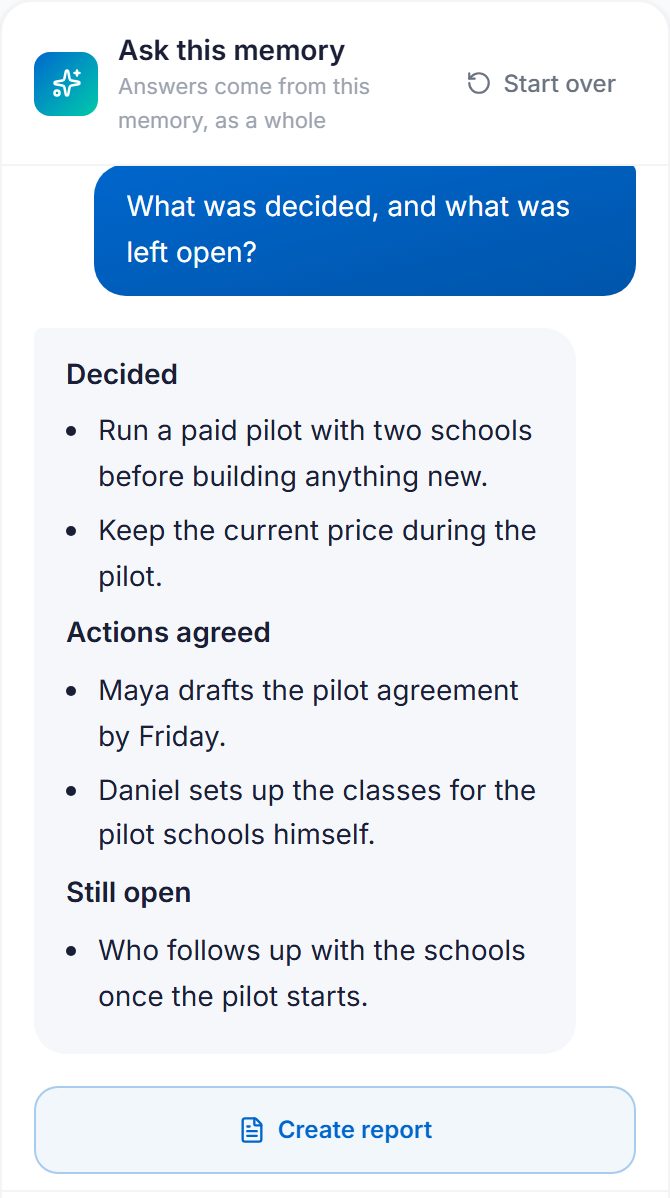
The Ask this memory panel answering what was decided and what was left open
Asking a meeting what was decided — and what is still open.
  1. Open any memory.
  2. Use the Ask this memory panel on the right. On your phone, tap the white Ask this memory button at the top.
  3. Pick a suggested question, or write your own.

The conversation stays with the memory, so it's there when you come back. Start over clears it — the memory itself never changes.

Turn a conversation into a report

Some conversations end in something worth handing over: the key points of a meeting, a step-by-step plan, how a project evolved. Create report turns the conversation into that document — organised by theme and ready to share, not a copy of the questions and answers.
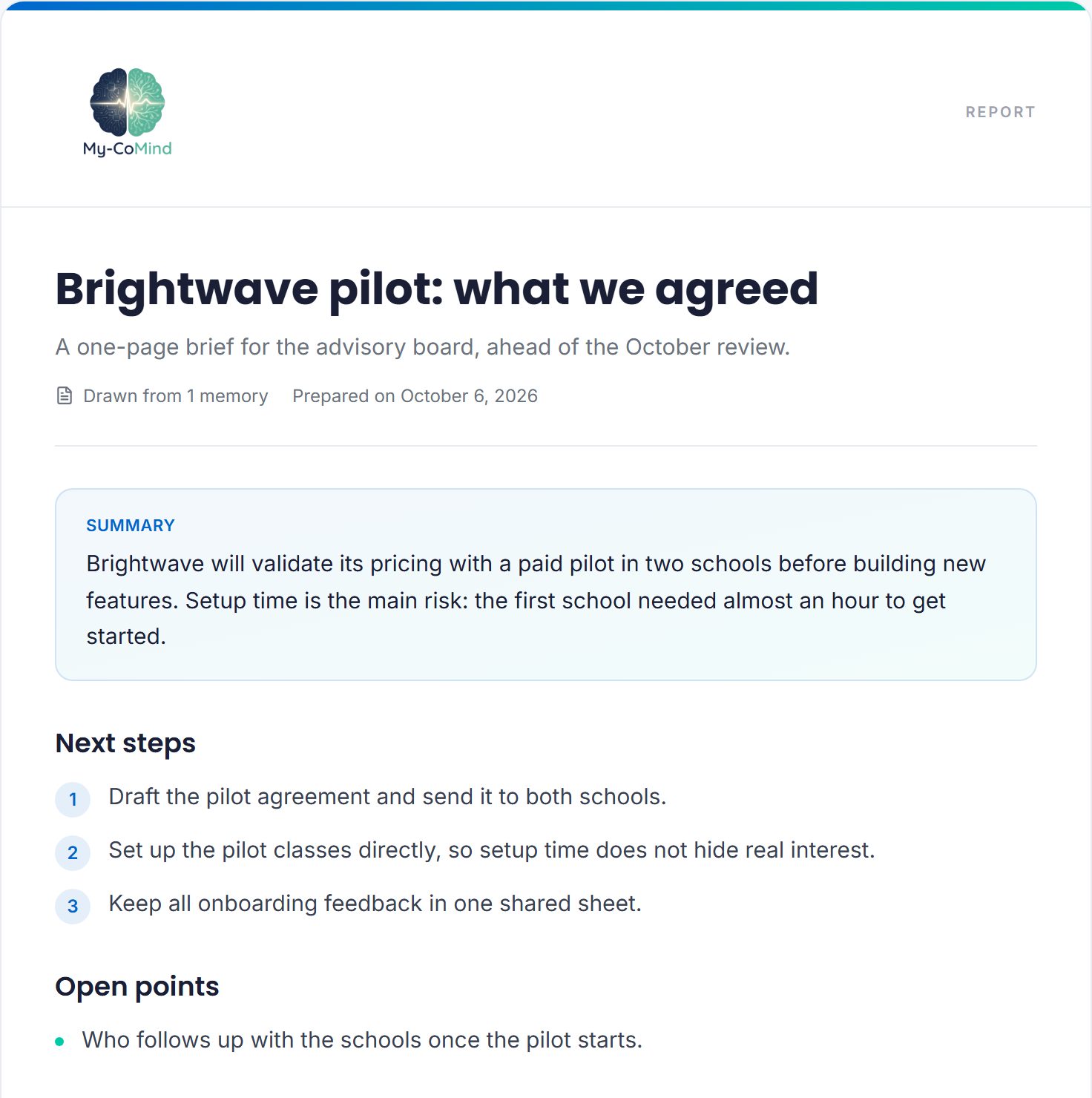
A shared report with a title, summary, next steps and open points
What the person you send it to sees — no account needed.
  1. In any chat — a memory, a workspace or AI Chat — tap Create report.
  2. Review the draft. Edit any text, reorder or remove sections, or ask for a different version: "shorter", "in 5 points", "as a step-by-step".
  3. Create a link and send it. It lasts 7 days, and the reader can save the report as a PDF.

Nothing is shared until you create the link, and the reader sees the report only — never the conversation behind it. In an organization's project chat, only owners and admins can create reports, because the content comes from what members shared with the organization.

Also in this release

  • The memory page and the chats work properly on every phone: buttons no longer run off the screen, and the help bubble no longer covers Send.

Converse com cada memória e transforme a conversa em relatório

Uma reunião de uma hora pode ter uma dúzia de decisões. Até agora, encontrar cada uma significava reler a transcrição. Esta versão muda isso — e ainda permite entregar o que você concluiu.

Ask this memory — converse com a memória

Agora cada memória tem a sua própria conversa. Pergunte o que foi decidido, o que ficou em aberto, quem combinou o quê — ou discuta. A resposta vem da memória inteira, não só do resumo, e, se o assunto não está nela, ela avisa.

O painel Ask this memory respondendo o que foi decidido e o que ficou em aberto
Perguntando a uma reunião o que foi decidido — e o que continua em aberto.
  1. Abra qualquer memória.
  2. Use o painel Ask this memory, à direita. No celular, toque no botão branco Ask this memory, no topo da página.
  3. Escolha uma pergunta sugerida ou escreva a sua — pode perguntar em português.

A conversa fica guardada junto com a memória, então continua lá quando você voltar. Start over apaga a conversa — a memória em si nunca muda.

Transforme uma conversa em relatório

Algumas conversas terminam em algo que vale entregar para alguém: os pontos principais de uma reunião, um passo a passo, como um projeto evoluiu. Create report transforma a conversa nesse documento — organizado por tema e pronto para compartilhar, e não uma cópia das perguntas e respostas.

Um relatório compartilhado com título, resumo, próximos passos e pontos em aberto
O que a pessoa que recebe o link vê — sem precisar de conta.
  1. Em qualquer chat — de uma memória, de um workspace ou no Chat IA — toque em Create report.
  2. Revise o rascunho. Edite qualquer trecho, reordene ou remova seções, ou peça outra versão: "mais curto", "em 5 pontos", "em formato de passo a passo".
  3. Gere o link e envie. Ele vale por 7 dias, e quem recebe pode salvar o relatório em PDF.

Nada é compartilhado até você gerar o link, e quem recebe vê só o relatório — nunca a conversa por trás dele. No chat de um projeto da organização, só donos e administradores podem gerar relatórios, porque o conteúdo vem do que os membros compartilharam com a organização.

Também nesta versão

  • A página da memória e os chats funcionam direito em qualquer celular: os botões não saem mais da tela, e o botão de ajuda não cobre mais o enviar.
1.4September 30, 202630 de setembro de 2026

The organization plan, and work that stays with it

  • If someone else pays for your account, My-CoMind asks one question after each capture: is this yours, or does it belong to them? Answer "mine" and nothing changes. Nobody paying for their own subscription is ever asked.
  • Share a whole workspace with them in one go — everything in it, and anything you add to it later.
  • When a mentor or employee leaves, their workspaces pass to whoever takes over in one step, with the full history intact.
  • The organization sees what it holds, not what is in it — a list of workspaces and who holds each. A program leader cannot open anyone's memories.
  • An organization can hand the work back: releasing a workspace returns every memory in it to the people who captured it.
  • The organization plan now sits next to Free and Full Access on the signup screen, priced per person.

O plano para organizações, e o trabalho que fica com ela

  • Se outra pessoa paga pela sua conta, o My-CoMind faz uma pergunta depois de cada captura: isto é seu ou é deles? Responda "meu" e nada muda. Quem paga a própria assinatura nunca é perguntado.
  • Compartilhe um workspace inteiro de uma vez — tudo o que está nele e o que você acrescentar depois.
  • Quando um mentor ou funcionário sai, os workspaces dele passam para quem assume, em um passo, com todo o histórico.
  • A organização vê o que tem, não o que há dentro — a lista de workspaces e quem cuida de cada um. Um líder de programa não consegue abrir as memórias de ninguém.
  • A organização pode devolver o trabalho: liberar um workspace devolve cada memória a quem a registrou.
  • O plano para organizações agora aparece ao lado do Free e do Full Access na tela de cadastro, com preço por pessoa.
1.3September 16, 202616 de setembro de 2026

Microsoft Teams meetings

  • Teams meetings can become memories. Connect Microsoft Teams once and the meetings you were in arrive as possible memories, ready to review. No recorder to install.
  • Meetings you were invited to count too, not only the ones you organized — the case that matters for mentors and advisors.
  • Possible memories say where they came from, with a filter by source once you connect more than one tool.
  • "Sync now" syncs all your tools, not just the first one you connected.
  • Teams needs your administrator's approval — My-CoMind writes that request for you, ready to send.

Reuniões do Microsoft Teams

  • Reuniões do Teams podem virar memórias. Conecte o Microsoft Teams uma vez e as reuniões de que você participou chegam como possíveis memórias, prontas para revisar. Nada para instalar.
  • Reuniões para as quais você foi convidado também contam, não só as que você organizou — o caso que importa para mentores e conselheiros.
  • As possíveis memórias mostram de onde vieram, com filtro por origem quando você conecta mais de uma ferramenta.
  • "Sync now" sincroniza todas as ferramentas, não só a primeira que você conectou.
  • O Teams precisa da aprovação do administrador da sua empresa — o My-CoMind escreve esse pedido para você, pronto para enviar.
1.2August 24, 202624 de agosto de 2026

Programs can pay for a group

  • An accelerator, university or venture program can buy seats and hand them out by email. The people in those seats pay nothing.
  • Adding someone gives them access right away — no invitation to find. Someone without an account keeps the seat until they sign up with that address.
  • Swapping people is free: a removed person's seat is immediately available for the next one.
  • Leaving a program costs you nothing — your memories, workspaces and conversations stay exactly as they are.
  • The program administers, it does not read: a program leader manages seats and has no access to anyone's memories.

Programas podem pagar por um grupo

  • Uma aceleradora, universidade ou programa pode comprar assentos e distribuí-los por e-mail. Quem ocupa o assento não paga nada.
  • Adicionar alguém dá acesso na hora — sem convite para procurar. Quem ainda não tem conta fica com o assento até se cadastrar com aquele e-mail.
  • Trocar pessoas não custa nada: o assento de quem sai fica disponível na hora para a próxima.
  • Sair de um programa não custa nada — suas memórias, workspaces e conversas continuam exatamente como estão.
  • O programa administra, não lê: o líder gerencia os assentos e não tem acesso às memórias de ninguém.
1.1August 22, 202622 de agosto de 2026

Meeting capture, desktop agent, continuity

  • Live Meeting Capture — record a meeting in the browser, microphone plus the meeting's own audio, and watch decisions and actions appear while it is still running.
  • Windows Desktop Agent — a tray app that notices you are probably in a call and asks whether to record it — it never starts on its own — and takes a quick note with Ctrl+Shift+M without opening anything.
  • "My-CoMind, remember that…" — said out loud during a capture, it becomes a marker on the memory, removable if the transcript got it wrong.
  • Cognitive Drift — ask a workspace or a project what shifted since you last looked, instead of re-reading it.
  • Share a workspace outside My-CoMind — a 7-day link and a printable report.
  • Everything generated follows your language — summaries, narratives and chat answers, in English or Portuguese.

The full story of this release

Captura de reuniões, agente desktop, continuidade

  • Live Meeting Capture — grave uma reunião no navegador, microfone e o áudio da própria reunião, e veja decisões e ações aparecerem enquanto ela ainda acontece.
  • Agente para Windows — um app na bandeja do sistema que percebe quando você provavelmente está numa chamada e pergunta se quer gravar — ele nunca começa sozinho — e faz uma nota rápida com Ctrl+Shift+M sem abrir nada.
  • "My-CoMind, remember that…" — dito em voz alta durante uma captura, vira uma marcação na memória, que você pode remover se a transcrição errou.
  • Cognitive Drift — pergunte a um workspace ou projeto o que mudou desde a última vez, em vez de reler tudo.
  • Compartilhe um workspace fora do My-CoMind — um link de 7 dias e um relatório para imprimir.
  • Tudo o que é gerado segue o seu idioma — resumos, narrativas e respostas do chat, em inglês ou português.

A história completa desta versão (em inglês)

See it with your own work

Veja com o seu próprio trabalho

Capture one real conversation and ask it what was decided.

Registre uma conversa de verdade e pergunte a ela o que foi decidido.